
Color Widgets
A home screen widget app: design widgets, icon packs and full phone themes on iPhone, iPad and Mac
4.6· 528,972 ratings on the App StoreQuick facts
- Free version
- Some data used for ads
- Data stays on your device
From Color Widgets's own pages, checked . See the sources
What is Color Widgets?
Color Widgets lets you dress up your home screen and lock screen on iPhone, iPad and Mac 🎨 Pick from a big library of ready-made widgets or build your own in the editor, with your photos, fonts, styles and colour schemes. There are widgets for photos, countdowns, weather, calendar, music, quotes, steps and even moon phases, plus user-made themes and icon packs to give your whole phone a new look ✨ You can use it for free, with an optional Pro upgrade that comes with a free trial. Made by Digital Charms, Inc.
Screenshots

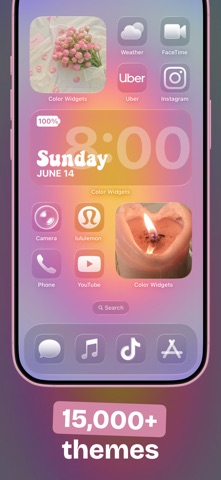
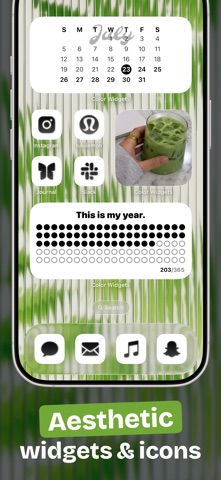
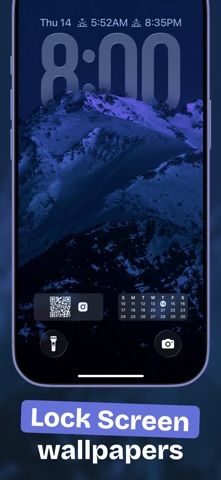


Screenshots from the App Store.
Who Color Widgets is for
iPhone, iPad and Mac users who want to style their home screen and lock screen with custom widgets, icons and wallpapers.
What Color Widgets does
- A big library of ready-made widgets, plus an editor to design your own
- Add your photos and change styles, fonts and colour schemes
- Countdown, weather, calendar, date, time and battery widgets
- Apple Music and Spotify widgets, plus custom text and quotes
- Widgets for both your lock screen and home screen
- Step count and activity widgets using Apple Health data, plus solar and moon phases
- User-made themes that combine widgets, icon packs and wallpapers
- Custom icon packs to replace your default app icons
Color Widgets pricing
Prices change and differ by country. Each line shows where and when we read it.
- Free version
There is a free version.
“Enjoy Color Widgets for free, with an optional upgrade to supercharge your experience.”
Source: apps.apple.com · checked Nov 13, 2026
- Paid plan
$2.50/month billed yearly
Color Widgets Pro, after a 3-day free trial, as stated in the US App Store description.
“If you decide to go Pro, enjoy a free 3-day trial and then it renews at USD$2.50/month billed yearly.”
Source: apps.apple.com · checked Nov 13, 2026
Color Widgets privacy: what the company says about your data
Taken from Color Widgets's own published pages, with the exact passage each line rests on. This is a summary of what the company states, not an audit of what it does.
- Advertising
Says some data is used or shared for advertising.
The policy says ads served from Google may be shown in the app, never in widgets.
“This information may be used by Color Widgets and others to, among other things, analyze and track data, determine the popularity of certain content, deliver advertising and content targeted to your interests on our Services and other websites and online services, and better understand your online activity.”
Source: colorwidgets.app · checked Nov 13, 2026
- Where your data is kept
Your data is kept on your device.
Covers photos, health data and other widget data; weather widgets send location to OpenWeather, and analytics use Firebase.
“Any data that is “on-device” cannot be accessed by us and will never be uploaded, or shared.”
Source: colorwidgets.app · checked Nov 13, 2026
See how every listed app answers these questions in our app privacy data, or put Color Widgets side by side with another app in the app privacy checker.
HerFound added this listing from public information. Facts aren't founder-confirmed yet. We don't publish ratings of our own; a star rating shown here is Apple's, linked to the App Store. Spotted something wrong? Tell us and we'll fix it. How HerFound compiles listings.
Color Widgets: common questions
There is a free version. The paid plan is listed at $2.50/month billed yearly (Color Widgets Pro, after a 3-day free trial, as stated in the US App Store description). Source: apps.apple.com, checked Nov 13, 2026.
Color Widgets says some data is used or shared for advertising. Source: colorwidgets.app, checked Nov 13, 2026.
Your data is kept on your device. Source: colorwidgets.app, checked Nov 13, 2026.
Color Widgets is available on iOS.
Alternatives to Color Widgets
More from Habit and Lifestyle Apps.

Widgetsmith
A widget maker: design your own home screen and lock screen widgets for iPhone and iPad

Widgetable
A shared widgets app: raise a virtual pet and share little moments on your friends' home screens.

Munch
A visual food diary: snap your meals, see them on a calendar and spot patterns, with no calories or guilt.

Noonlight
A personal safety app: hold a button when you feel uneasy, and help is sent to your location if you let go.